AI and LLMs are reshaping how we design and build user interfaces. Tools like Stitch, Lovable, and Figma are evolving to put AI at the center of the workflow. In this post we explore the new AI design landscape, how it impacts UI/UX designers, and what it means for established tools like Figma.
The New AI Design Landscape
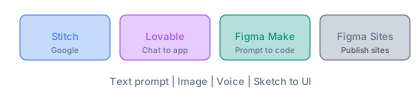
Stitch (Google Labs)
Stitch is an AI-native design canvas from Google Labs. You describe what you want in text, images, sketches, or voice, and Stitch generates high-fidelity UI designs and frontend code.
Key features:
- Vibe design – Start with business objectives and desired user feelings instead of wireframes. Describe the outcome you want; the AI explores many directions quickly.
- Voice Canvas – Speak directly to the canvas. The AI listens and makes live design updates, gives critiques, or designs a landing page by interviewing you.
- AI-native infinite canvas – Ideas move from sketches to working prototypes without switching tools. Bring images, text, or code as context.
- Design agent – Reasons across the entire project. An Agent manager tracks progress and lets you work on multiple ideas in parallel.
- DESIGN.md – Agent-friendly markdown for design systems. Extract from any URL or export/import rules to other tools.
- Export – Send designs to Figma (with Auto Layout) or download HTML/CSS. Integrates with AI Studio, Antigravity, and coding tools via MCP.
Stitch is free and runs in the browser. It represents a shift from wireframe-first to intent-first design.
Lovable
Lovable is an AI app builder where you create apps and websites by chatting with AI. No coding required.
Key features:
- Chat-based building – Describe what you want in natural language; the AI generates the app in real time.
- Visual editing – Adjust UI elements, layouts, colors, fonts, and images without code. Changes appear in a live preview.
- Figma integration – Import Figma prototypes and turn them into functional apps.
- One-click deploy – Deploy to global infrastructure with automatic scaling.
Lovable targets founders, product people, and non-developers. Over 50,000 apps have been built by 25,000+ users across 120+ countries. Plans range from Free ($0) to Pro ($25/month) and Business ($50/month).
Figma: Evolving With AI
Figma remains the dominant design tool. It is adding AI rather than being replaced by it.
Figma Make – Prompt-to-code. Describe your site or app in natural language; Figma Make generates layout, structure, and interactions. Drop a design file in and chat with AI to create a live, functional app.
Figma Sites – Publish responsive websites. Design in Figma, optionally use AI to create "code layers" for custom functionality, then publish. No separate dev environment required for simple sites.
Figma MCP – Connect Figma to AI coding tools (e.g. Cursor, OpenCode). Design context flows directly into agentic coding workflows.
Dev Mode – Specs, annotations, and code snippets in one place for design-to-dev handoff. AI accelerates this handoff.
Figma is betting on AI as an extension of the design workflow, not a replacement for the canvas, components, and collaboration that designers rely on.
How AI Impacts UI/UX Designers
What AI Handles Well
Generative AI excels at:
- Layout variations – Multiple UI variants in minutes (e.g. 12 layouts in 4 minutes) instead of hours.
- Visual assets – Color palettes, icons, illustrations from text prompts.
- Repetitive work – Accessibility checks, design system updates, asset generation.
- Design-to-code – Converting UI into functional code, reducing handoff friction.
- Rapid iteration – Exploring many directions before committing.
Surveys suggest 93% of designers are already using generative AI tools. The question is no longer "Should we use AI?" but "How do we use it responsibly and strategically?"
The Evolving Designer Role
As AI takes over production work, designers are shifting toward:
- Product strategy – Defining what to build and why, not just how it looks.
- Information architecture – Structuring content and flows across complex systems.
- Experience orchestration – Coordinating user journeys across touchpoints.
- Brand direction – Ensuring aesthetic and emotional consistency.
- User research – Empathy, interviews, and data-driven decisions.
- Cross-functional leadership – Aligning design with business and engineering.
The traditional design-to-development handoff is changing. AI agents can generate interfaces and write code at the same time. Designers who guide intent, validate outcomes, and own the user experience will remain central.
What Stays Human
Human judgment is still essential for:
- Brand identity – What the product stands for and how it should feel.
- Emotional tone – Crafting experiences that resonate.
- Cohesive systems – Keeping design consistent across products and platforms.
- Ethics and accessibility – Ensuring AI-generated designs serve all users.
- Stakeholder alignment – Translating business goals into design decisions.
AI amplifies execution; it does not replace vision, taste, or empathy.
What Happens to Tools Like Figma?
Figma Is Adapting, Not Disappearing
Figma is integrating AI across its products:
- Figma Make – Prompt-to-code for prototypes and apps.
- Figma Sites – Publish websites with optional AI-generated code layers.
- Figma MCP – Bridge to AI coding agents.
- AI features – Assistants for layout, assets, and design exploration.
The core value of Figma—collaborative design, components, design systems, and Dev Mode—remains. AI is layered on top to speed up iteration and close the gap to code.
Competition and Coexistence
AI-native tools (Stitch, Lovable, Uizard, etc.) start from prompts and conversation. They optimize for speed from idea to working UI. Some designers will prefer them for early exploration and MVPs.
Traditional tools (Figma, Sketch, Adobe XD) optimize for precision, collaboration, and design systems. They remain the default for teams that need pixel control, version history, and handoff to developers.
Hybrid workflows – Stitch exports to Figma. Lovable imports from Figma. Figma connects to AI coding tools via MCP. The tools are learning to work together rather than replace each other.
Design Systems and Collaboration
Design systems, component libraries, and team collaboration are hard to replicate with prompt-only tools. Figma’s strength is shared libraries, variables, and multi-player editing. AI tools that integrate with Figma (or offer similar structure) will have an advantage in professional workflows.
The Direction of Travel
- Faster ideation – AI generates many options quickly; designers curate and refine.
- Tighter design-to-code loop – Less manual handoff; AI translates design to implementation.
- More design-capable non-designers – Founders and PMs can prototype without a designer; designers focus on strategy and polish.
- New tool categories – AI-native canvases (Stitch), chat-to-app builders (Lovable), and enhanced traditional tools (Figma Make, Sites) will coexist.
Practical Takeaways for Designers
- Learn the new tools – Try Stitch, Lovable, and Figma Make. Understand their strengths and limits.
- Double down on strategy – Product thinking, research, and experience orchestration will matter more as execution is automated.
- Own design systems – Components, variables, and consistency are where human judgment and tooling intersect.
- Embrace AI in the workflow – Use AI for exploration and iteration; use your judgment for final decisions.
- Stay close to users – Empathy and research differentiate human-led design from generic AI output.
Summary
- Stitch – AI-native canvas with vibe design, voice, and export to Figma/code. Free, from Google Labs.
- Lovable – Chat-to-app builder with visual editing and Figma import. For rapid prototyping and non-developers.
- Figma – Adding Make (prompt-to-code), Sites (publish websites), and MCP. Evolving, not being replaced.
- Designers – Shifting from production to strategy, research, and orchestration. AI handles iteration; humans own vision and coherence.
- Design tools – AI-native and traditional tools will coexist. Integration (Stitch to Figma, Figma MCP) matters as much as raw capability.
AI is changing how we design, but it is not replacing the need for designers. It is changing what designers spend time on: less pixel-pushing, more thinking, guiding, and ensuring that what gets built serves users well.
Comments