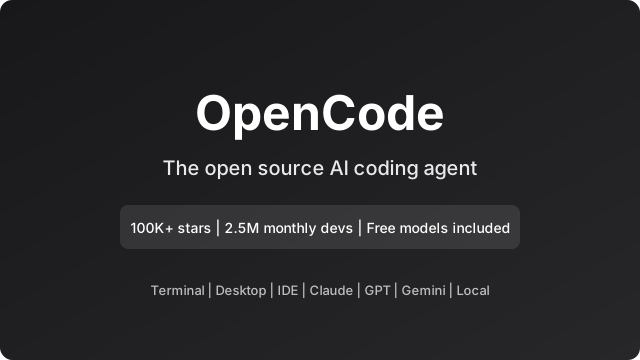
OpenCode is an open-source AI coding agent that helps you write code in your terminal, IDE, or desktop app. With over 100,000 GitHub stars, 700 contributors, and 2.5 million developers using it every month, it has become one of the most popular AI coding tools. In this post we cover what OpenCode is, what you get from it, use cases, examples, and everything you need to know.
What Is OpenCode?
OpenCode is an open-source AI agent built for coding. It runs locally and connects to any LLM provider: Claude, GPT, Gemini, or local models via Ollama. Unlike cloud-only assistants, OpenCode gives you a vendor-agnostic alternative to proprietary tools like Claude Code.
Key points:
- Open source – MIT licensed, developed by Anomaly, hosted at github.com/anomalyco/opencode
- Multi-interface – Terminal UI, desktop app (macOS, Windows, Linux), and IDE extension
- Model-agnostic – Free models included, or connect 75+ providers via Models.dev
- Privacy-first – Does not store your code or context data; suitable for sensitive environments
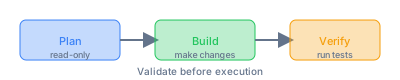
Two built-in agents:
- Plan – Read-only mode. Analyzes the codebase and suggests changes without making them. Use it to explore legacy code or review implementation plans.
- Build – Full-access mode. Makes changes, runs commands, and implements features. Use it when you are ready to apply changes.
The workflow is Plan → Build → Verify: validate suggestions before execution, then run tests to confirm everything works.
What Can You Get From OpenCode?
LSP enabled – Automatically loads the right Language Server Protocol (LSP) for the LLM, so it understands your project’s types and structure.
Multi-session – Run multiple agents in parallel on the same project. Useful for different tasks or experiments at once.
Share links – Share a link to any session for reference or debugging. Example: opencode.ai/s/4XP1fce5
Existing subscriptions – Log in with GitHub to use your Copilot account, or with OpenAI to use ChatGPT Plus/Pro. No need for separate API keys if you already have these.
Any model – 75+ LLM providers through Models.dev, including local models (Ollama). Use free models or bring your own API keys.
Zen – OpenCode Zen is a curated set of models tested and benchmarked by the OpenCode team for coding agents. Reduces variability across providers.
GitHub integration – Use
/opencodeor/ocin issue or PR comments. OpenCode can run in GitHub Actions, create branches, submit PRs, fix issues, and implement features.
How to Use OpenCode
Installation
One-liner (recommended):
curl -fsSL https://opencode.ai/install | bashPackage managers:
npm install -g opencode-ai
# or
brew install anomalyco/tap/opencode   # macOS/Linux
paru -S opencode-bin                 # Arch Linux
choco install opencode               # Windows
scoop install opencode              # Windows
Docker:
docker run -it --rm ghcr.io/anomalyco/opencodeConfigure
Run OpenCode and use /connect to add an LLM provider. You can use OpenCode Zen (free models), or add API keys for Claude, OpenAI, Gemini, or others.
Initialize a Project
cd /path/to/project
opencode
Then run /init. OpenCode analyzes the project and creates an AGENTS.md file with project structure and coding patterns. This helps the agent understand your codebase.
Basic Usage
Ask questions:
How is authentication handled in @packages/functions/src/api/index.tsAdd features (Plan first): Switch to Plan mode with Tab, describe the feature, review the plan, then switch back to Build mode and ask it to implement.
Make changes directly:
We need to add authentication to the /settings route. Take a look at how this is
handled in the /notes route in @packages/functions/src/notes.ts and implement
the same logic in @packages/functions/src/settings.ts
Undo / Redo: Use /undo to revert changes, /redo to reapply them.
Share: Use /share to create a link to the current conversation.
Use Cases and Examples
1. Legacy Refactor
Split a large file into modules while updating imports:
Take main.py. Split the database logic into db.py and the utils into utils.py. Update all imports.OpenCode can run pytest afterward to ensure nothing broke.
2. Test-Driven Development (TDD)
Implement a feature by writing a failing test first:
Run npm test. Read the failure. Implement the code in feature.ts to make the test pass.The agent gets immediate feedback from the test runner output.
3. Documentation Maintenance
Keep docs in sync with code:
Read all exported functions in src/api. Update docs/API.md to match the current signatures.4. Language or Paradigm Migration
Port a React Class component to Hooks:
Read Component.jsx. Rewrite it as a Functional Component using Hooks. Keep the same prop types.5. Security Audit (Local)
Scan for hardcoded secrets without sending code to the cloud. Use a local model (e.g. Ollama):
Scan src/ for any strings that look like API keys. Report line numbers.6. Feature Scaffolding
Create new API endpoints with handlers, validation, and tests. Use Plan mode to review the structure first, then Build to implement.
7. Codebase Exploration
Use Plan mode (read-only) to explore unfamiliar code:
Explain the authentication flow in this codebase. Do not make any changes.8. MCP-Powered Workflows
With Model Context Protocol (MCP), OpenCode can connect to databases, APIs, and analysis tools:
- "Generate a seed script with 50 fake users."
- "Write a migration to add a 'last_login' column."
- "Show me the schema for the 'users' table."
The agent queries the DB via MCP to understand types before writing code.
9. GitHub Integration
In issue or PR comments, use /opencode or /oc to trigger OpenCode. It can:
- Fix bugs
- Implement features
- Triage issues
- Create branches and submit PRs
Runs securely inside GitHub Actions runners.
Cost and Subscriptions
- OpenCode software – Free and open source.
- Models – Free models are included via Zen. Or use your own API keys (Claude, OpenAI, Gemini, etc.).
- Existing subscriptions – GitHub Copilot and ChatGPT Plus/Pro can be used directly; no extra subscription required if you already have them.
Privacy and Data
OpenCode does not store your code or context data. It is designed for privacy-sensitive environments. Your code stays on your machine; only prompts and responses go to the LLM provider you choose. For maximum privacy, use local models (Ollama).
Summary
- What: OpenCode is an open-source AI coding agent for terminal, desktop, and IDE. Plan (read-only) and Build (full-access) agents with a Plan → Build → Verify workflow.
- What you get: LSP support, multi-session, share links, GitHub/Copilot/ChatGPT login, 75+ models, Zen curated models, GitHub integration.
- How to use: Install via one-liner or package manager,
/connectfor providers,/initfor projects, then ask questions or request changes. - Use cases: Legacy refactor, TDD, documentation, language migration, security audits, feature scaffolding, codebase exploration, MCP workflows, GitHub automation.
- Cost: Free software; model costs depend on provider. Free models available via Zen.
- Privacy: No code or context storage; suitable for sensitive environments.
OpenCode is one of the fastest-growing open-source AI coding tools. If you want an agent that runs locally, works with any model, and gives you control over your code and data, it is worth trying. Start with Plan mode on a non-critical task, then move to Build once you are comfortable.
Comments