HTMX is a small JavaScript library that lets you build dynamic, interactive web UIs using HTML attributes instead of writing a lot of custom JavaScript or adopting a heavy front-end framework. It follows the hypermedia approach: the server sends HTML, and the client uses that HTML to drive behavior. In this post we cover what HTMX is, how it works, where to use it, its main features, and some example use cases.
What Is HTMX?
HTMX stands for Hypermedia and the Web. It is a dependency-free (or minimal-dependency) script that you include in your page. Once loaded, it interprets special HTML attributes such as hx-get, hx-post, hx-swap, and hx-trigger to:
- Issue HTTP requests (GET, POST, PUT, DELETE, etc.) from any element (not just forms and links).
- Swap parts of the page with the HTML returned by the server.
- Trigger those requests on click, submit, change, or other events.
The idea is simple: you stay in HTML. You don’t build a separate JSON API and a client app that fetches data and renders it. The server responds with HTML fragments, and HTMX injects them into the DOM. That keeps logic and rendering on the server and keeps the client thin.
How It Works
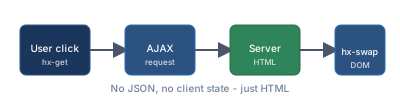
Declare behavior in HTML
You add attributes likehx-get="/api/content",hx-trigger="click", andhx-swap="innerHTML"to a button, link, or div.User interaction
When the user clicks (or another trigger fires), HTMX makes an HTTP request to the URL you specified, using the method you specified (e.g. GET or POST).Server responds with HTML
Your server returns HTML (often a small fragment, not a full page). It does not need to return JSON unless you explicitly want to handle it.HTMX updates the DOM
Usinghx-swap, HTMX takes the response and replaces (or appends to) the target element. By default it targets the element that has the attribute, but you can point to another element withhx-target.
No build step, no virtual DOM, no client-side routing. Just HTML in, HTML out, with a small script in the middle.
Key Features
Attributes Instead of JavaScript
hx-get,hx-post,hx-put,hx-patch,hx-delete– which URL to request and with which method.hx-trigger– when to fire (e.g.click,submit,change,load, or a custom event). You can add modifiers likeonce,delay, orthrottle.hx-swap– how to insert the response:innerHTML,outerHTML,beforeend,afterend, etc.hx-target– which element to update (default is the current element).hx-headers– extra headers to send with the request.
You can do a lot without writing any fetch() or addEventListener() code.
Partial Responses and Targeting
The server can return a full page or a fragment. HTMX can:
- Replace only the content inside an element (
innerHTML). - Replace the element itself (
outerHTML). - Insert before/after a node.
- Use CSS selectors in
hx-targetto update another part of the page (e.g. a sidebar or a modal).
So you design your server to return the minimal HTML that represents the new state, and HTMX puts it in the right place.
Extensions and Events
HTMX has an extension mechanism and fires events (e.g. before request, after swap, on error). You can:
- Add client-side behavior (e.g. animations, validation) via extensions or small scripts.
- Integrate with existing JavaScript (e.g. to show toasts or update a counter) by listening to HTMX events.
Small and Simple
The library is a single script (or a small set of files). You include it via a <script> tag or a package manager. No bundler or framework is required. It works with any server stack that can return HTML (Go, Python, PHP, Ruby, .NET, etc.).
Where HTMX Can Be Used
- Traditional server-rendered apps – Add dynamic behavior (infinite scroll, inline edit, live search) without rewriting the app as an SPA.
- Admin panels and internal tools – Tables with sort/filter, modals, tabs, and forms that update in place are straightforward.
- Content sites with interactivity – Comments, “load more”, voting, or toggles that swap content without a full reload.
- Prototypes and MVPs – Ship something fast with server-side templates and HTMX, then refine or replace parts later if needed.
- Hybrid apps – Use HTMX for most pages and keep a heavier framework (e.g. React) only for a few complex screens.
HTMX is less suited when you need:
- Heavy client-side state (complex wizards, real-time collaboration, or very stateful UIs).
- Offline-first or rich client-side routing with deep URL state.
- Teams that are already committed to a full SPA and a JSON API for everything.
In those cases, a framework like React, Vue, or Svelte may still be the right tool for (part of) the app.
Example Use Cases
1. “Load more” or infinite scroll
A “Load more” button or a sentinel element can have hx-get="/posts?page=2", hx-trigger="click" (or revealed for infinite scroll), and hx-swap="beforeend" so new HTML is appended to a list. The server returns the next chunk of items as HTML.
2. Inline edit
A row or field has an “Edit” button with hx-get="/item/123/edit" and hx-target="#row-123". On click, the server returns the form HTML; HTMX swaps it in. On submit, the form uses hx-post and hx-swap to replace the row with the updated view. No separate “edit page” and no JSON.
3. Search or filter without full reload
A search input has hx-get="/search", hx-trigger="keyup changed delay:300ms", and hx-target="#results". As the user types, HTMX sends the query and the server returns the results as HTML; #results is updated. Optional: use hx-include to send the current value of the input.
4. Dynamic forms and validation
A form can use hx-post and hx-swap="innerHTML" with hx-target="this" so the server returns the same form with errors or success message inline. Or use hx-post with hx-swap="none" and listen to HTMX events to show a toast and redirect.
5. Tabs or accordions
Each tab trigger has hx-get="/section/1", hx-target="#panel", and hx-push-url="true" so the URL updates. The server returns the panel content as HTML. No client-side tab state beyond what’s in the URL.
6. Modals and dialogs
A button opens a modal with hx-get="/modal/content", hx-target="#modal-body", and hx-swap="innerHTML". The server returns only the modal body HTML. Close can be another HTMX request or a small script that hides the modal.
A Minimal Code Example
HTML (with HTMX):
<button hx-get="/api/greeting"
        hx-trigger="click"
        hx-swap="innerHTML"
        hx-target="#output">
  Say hello
</button>
<div id="output"></div>

<script src="https://unpkg.com/htmx.org@1.9.10"></script>
Server (pseudo-code):
For GET /api/greeting, respond with a fragment, e.g.:
<span>Hello from the server!</span>When the user clicks the button, HTMX fetches that URL and puts the response inside #output. No fetch, no JSON, no template on the client.
Summary
- HTMX is a small script that uses HTML attributes to drive AJAX requests and DOM updates.
- You add
hx-*attributes; on trigger, HTMX requests a URL and swaps the response into the page. The server returns HTML. - Server-rendered apps, admin UIs, content sites with light interactivity, prototypes, or hybrid apps.
- Declarative attributes for method, URL, trigger, swap, and target; partial responses; extensions and events; no build step.
- Load more, inline edit, search/filter, dynamic forms, tabs, modals, and any place where “fetch a bit of HTML and put it here” is enough.
If you like the idea of keeping logic and templates on the server and using a thin, HTML-centric client, HTMX is worth trying. You can add it to an existing page and introduce dynamic behavior incrementally without rewriting the rest of the stack.
Comments