Stitch is an AI-powered UI design tool from Google Labs that turns natural language, images, sketches, or voice into high-fidelity user interfaces. It runs in your browser at stitch.withgoogle.com, is free to use, and is built around a new way of designing: start with intent, not wireframes. In this post we cover what Stitch is, the idea behind it, how it works, what you can do with it, and how it helps.
What Is Stitch?
Stitch is an AI-native software design canvas from Google Labs. You describe what you want—in text, images, sketches, or voice—and Stitch generates complete UI designs and frontend code. It was first announced at Google I/O in May 2025 and has since evolved with Gemini 3 and a major redesign in March 2026.
In short: Stitch helps anyone create, iterate, and collaborate on high-fidelity UI from natural language, without traditional design tools or expertise.
The Idea Behind Stitch
Intent-First Design ("Vibe Design")
Traditional design starts with wireframes: boxes, placeholders, and structure. Stitch flips this. You start by describing:
- Business objectives – What you want the product to achieve
- User feelings – How you want users to feel when using it
- Inspiration – Examples of what you like
The AI explores many directions quickly. Instead of drawing wireframes first, you describe intent and let the AI propose layouts, components, and flows. This "vibe design" approach is meant to surface better ideas faster by focusing on outcomes instead of low-fidelity scaffolding.
Closing the Gap From Idea to Reality
Stitch aims to shrink the time between an idea and a working UI. Whether you are a professional designer exploring variations or a founder with a first product idea, the goal is to go from concept to high-fidelity design in minutes instead of days.
Democratizing UI Creation
Stitch is built so people without design training can create usable interfaces. You describe what you want; the AI handles layout, typography, spacing, and structure. That lowers the barrier for founders, PMs, and developers who need to prototype quickly.
How Stitch Works
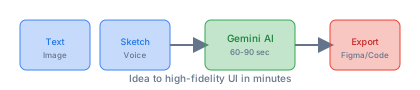
Input: Multimodal
You can provide context in several ways:
- Text – Describe the screen, flow, or feeling in plain language
- Images – Upload screenshots, references, or inspiration
- Sketches – Rough wireframes or hand-drawn mockups
- Voice – Speak directly to the canvas; the AI listens and updates in real time
Processing: Gemini Models
Stitch uses Google’s Gemini models:
- Gemini 3 – Better contextual understanding, polished layouts, improved accessibility (default)
- Gemini 2.5 Pro – Higher fidelity when you need it
- Gemini 2.5 Flash – Faster generation for quick iteration
Design generation typically takes 60–90 seconds depending on complexity and model. You can generate multiple variants at once (e.g. up to five versions of a page) with different layouts, headlines, or sections.
Output: Designs and Code
- Interactive prototypes – Click through flows, test user journeys
- Export to Figma – With Auto Layout and editable layers
- HTML/CSS – Download production-ready markup and styles
- React + Tailwind – Component-ready code
- Flutter – For cross-platform apps
What Can You Do With Stitch?
1. Generate UI From Text
Describe a screen in plain language:
"A landing page for a meditation app. Calm, minimal, with a hero section, three feature cards, and a CTA. Use soft blues and whites."
Stitch generates one or more design variants in about a minute.
2. Vibe Design With Intent
Skip wireframes and describe outcomes:
"I want users to feel trusted and in control when they see their data dashboard. Make it feel professional but approachable."
The AI explores layouts and styles that match that intent.
3. Use Voice to Design
Speak to the canvas:
- "Give me three different menu options"
- "Show this screen in different color palettes"
- "Design a new landing page" (the AI can interview you and refine as you talk)
The agent gives real-time critiques and makes live updates as you speak.
4. Stitch Screens Into Flows
Turn static screens into interactive prototypes:
- Connect screens with clicks and transitions
- Click "Play" to preview the full user journey
- Stitch can suggest logical next screens based on where the user clicks
You can refine individual screens or entire flows with a few prompts.
5. Parallel Editing
Work on multiple directions at once:
- Generate up to five versions of a page in parallel
- Compare layouts, headlines, and components side by side
- Mix and match elements from different variants
6. Design Systems With DESIGN.md
Stitch supports DESIGN.md—an agent-friendly markdown format for design systems. You can:
- Extract a design system from any URL
- Export or import design rules to and from other tools
- Reuse design tokens across Stitch projects
This keeps typography, colors, and spacing consistent without redefining them each time.
7. Export to Your Workflow
- Figma – Paste designs with Auto Layout and editable layers
- AI Studio / Antigravity – Send designs to developer tools
- MCP – Use the Stitch MCP server and SDK to integrate with AI coding agents and skills
Stitch acts as a bridge between design and development.
8. AI-Native Infinite Canvas
The March 2026 redesign adds an infinite canvas where you can:
- Bring images, text, or code as context
- Move from early sketches to working prototypes without switching tools
- Use a design agent that reasons across the whole project
- Use an Agent manager to track multiple ideas in parallel
How Stitch Helps
For Designers
- Faster exploration – Many layout and style variants in minutes
- Less repetitive work – AI handles first drafts; you refine
- Voice as input – Stay in flow without typing
- Easy handoff – Export to Figma or code for developers
For Founders and PMs
- No design skills needed – Describe the product; get a UI
- Quick prototypes – Test ideas before hiring a designer
- Clear communication – Show stakeholders a real interface, not just descriptions
For Developers
- Design-to-code – Get HTML/CSS, React, or Flutter from Stitch
- MCP integration – Pull Stitch designs into AI coding workflows
- Consistent design systems – Use DESIGN.md across projects
For Teams
- Shared intent – Start from business goals and user feelings
- Parallel exploration – Multiple people can explore different directions
- Tool integration – Works with Figma, AI Studio, and coding agents
Getting Started
- Go to stitch.withgoogle.com
- Sign in with a Google account
- Describe your first screen in text, or upload an image or sketch
- Review the generated variants and refine with follow-up prompts
- Stitch screens together for interactive flows
- Export to Figma or download code when ready
No install required; it runs entirely in the browser. No subscription; it is free.
Summary
- What: Stitch is a free, browser-based AI design tool from Google Labs that turns text, images, sketches, or voice into high-fidelity UI.
- Idea: Intent-first "vibe design"—describe outcomes and feelings instead of wireframes. Close the gap from idea to UI in minutes.
- How it works: Multimodal input (text, image, sketch, voice) → Gemini AI (60–90 seconds) → Interactive prototypes and exports (Figma, HTML/CSS, React, Flutter).
- What you can do: Generate UI from text, vibe design with intent, use voice, stitch screens into flows, parallel edit, use DESIGN.md for design systems, export to Figma and code, integrate via MCP.
- How it helps: Faster exploration for designers, prototyping for non-designers, design-to-code for developers, and shared intent for teams.
Stitch is experimental but already useful for rapid UI exploration and prototyping. If you want to go from idea to interface quickly, without wireframes or design expertise, it is worth trying at stitch.withgoogle.com.
Comments